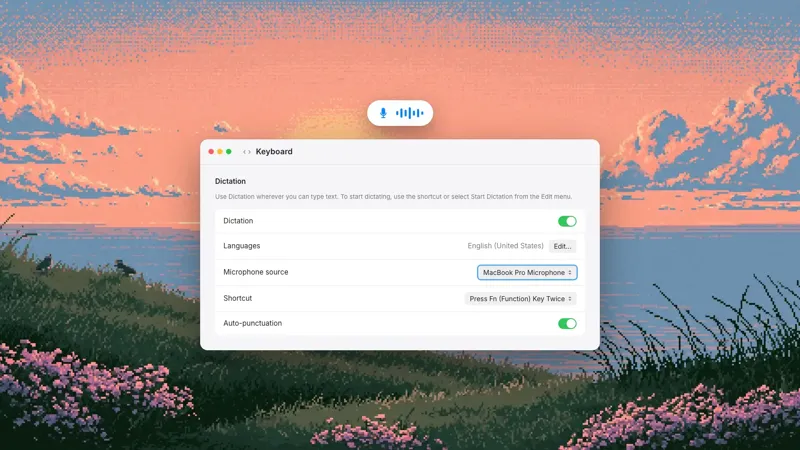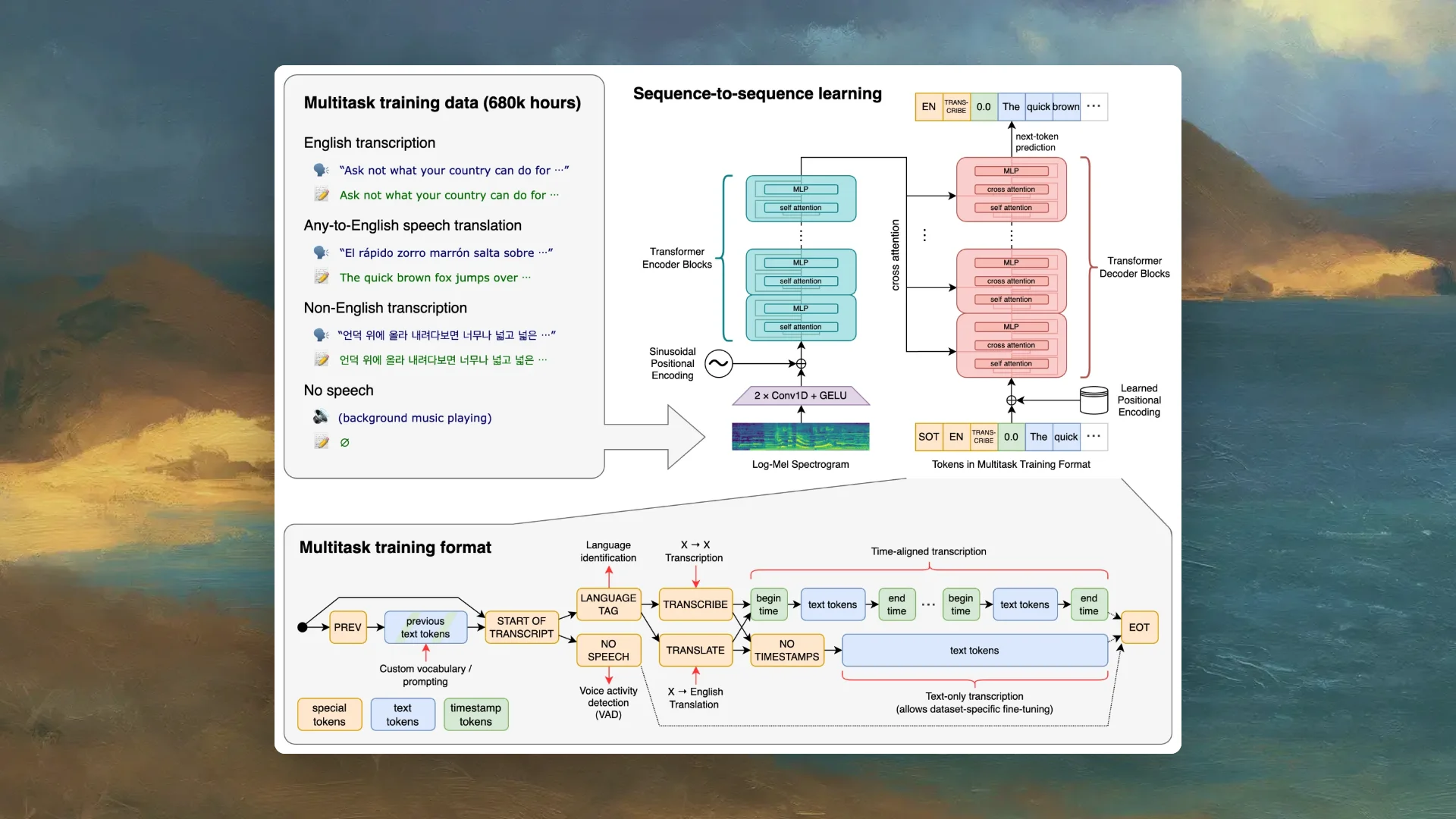
Whisper is a speech-recognition model. Give it audio and it returns a transcript. It does not provide a global Mac shortcut, microphone controls, filler removal, app-aware tone, cursor insertion, history, permissions setup, model downloads, or automatic updates by itself.
A complete dictation product builds that workflow around one or more speech models. Epilude is our top choice when the goal is polished text in any Mac app: it captures speech, transcribes it, runs Cleanup, accounts for the destination, and inserts the result at the active cursor. MacWhisper is the better product when the job starts with recorded audio or needs a transcript editor.
Quick answer
| Question | Answer |
|---|---|
| Is Whisper a Mac dictation app? | No. It is an open-source speech-recognition model and inference code. |
| Can Whisper transcribe audio locally? | Yes, when we install and run a compatible implementation on our computer. |
| Does Whisper remove filler and fix grammar? | It produces transcript text; product-level cleanup normally needs another stage. |
| Does Whisper type into Slack or Gmail? | Not by itself. An application must capture audio, invoke the model, and insert the result. |
| Is Whisper the same as MacWhisper? | No. MacWhisper is a product that packages local models and adds recording, files, editing, exports, dictation, and optional AI providers. |
| Whisper vs Epilude: which produces ready-to-send text? | Epilude, because Cleanup and cursor insertion are part of the product workflow. Whisper alone returns a transcript. |
What Whisper actually does
OpenAI describes Whisper as a general-purpose speech-recognition model for multilingual transcription, speech translation, and language identification. The open-source repository includes model weights, Python code, and command-line examples for turning an audio file into text.
That is useful, substantial work. It is also a narrower layer than the experience most people mean by “dictation app.” The basic operation looks like this:
Audio file → Whisper → transcript
The model does not know that we held a shortcut in Slack, that the cursor is in an email subject line, or that a repeated phrase was a correction rather than wording we meant to keep. A developer can build those decisions around it, but they are not features of the model weights.
Whisper also comes in several model sizes with different memory, speed, and accuracy tradeoffs. The official implementation expects a technical runtime and dependencies such as Python, PyTorch, and FFmpeg. That is appropriate for developers and research. It is not a polished Mac install, permission guide, menu-bar app, or writing workflow.
The nine jobs a dictation product adds
1. Microphone capture
The app needs to request macOS microphone permission, select an input, react when a Bluetooth device changes, show when recording is active, and stop cleanly. A model accepts audio in a supported format; it does not manage the microphone.
Good capture code also handles sample rates, silence, device interruptions, and the first fraction of speech after a shortcut. Those details can change the result before the model sees a waveform.
2. A shortcut we can trust
System-wide dictation needs a hotkey that works while Slack, Gmail, Notion, Cursor, Mail, or another app is active. Push-to-talk, toggle, cancel, and hands-free behaviours have to avoid colliding with existing shortcuts.
The product should never submit a message or terminal prompt unexpectedly. Whisper has no concept of an active app or keyboard event.
3. Audio preparation and model routing
Before inference, the app may normalize audio, split long input, detect silence, choose a language, and select a local or cloud model. Afterwards it has to join segments without repeated or missing words.
The official Whisper command-line tool can process a file in windows. A daily dictation product still has to decide how a press-and-release recording becomes one stable piece of text quickly enough to feel interactive.
4. Transcript cleanup
Speech recognition answers “what words were probably spoken?” Writing cleanup answers “what should appear on the page?” They are different problems.
We tested this thought:
Um, send it Thursday, no, make that Friday morning, and, you know, add Priya to the review.
A useful raw transcript may preserve every part. A useful message should usually become:
Send it Friday morning and add Priya to the review.
Epilude Cleanup removes filler, resolves false starts, adds punctuation, and formats lists after transcription. The cleanup stage has to remain faithful: changing Thursday to Friday is correct because we said so; inventing a reason for the change is not.
5. App and text-field context
The same thought should not always have the same shape. An email may need complete sentences, while a Slack message can be shorter. A code review comment should preserve a technical token. A blank field and selected text may imply different actions.
Tone Match lets Epilude account for the destination without asking us to pick a writing mode each time. Other products expose application rules, custom prompts, selected-text context, or screen context. Whisper itself only sees the audio supplied to it.
6. Vocabulary and corrections
Names, product terms, acronyms, filenames, and internal jargon often sound like common words. A product needs a durable correction system that can bias or repair the output without retraining the speech model.
Epilude Vocabulary stores the exact forms we want and applies them in Cloud mode and Local Mode. A bare Whisper installation can accept prompts or be wrapped in custom logic, but maintaining that personal vocabulary is application work.
7. Safe cursor insertion
Once text is ready, the app has to return focus to the correct field and insert it without losing clipboard contents, duplicating text, or typing into the wrong window. macOS Accessibility permission is often part of this step.
Custom web editors, secure fields, remote desktops, and apps that move focus can behave differently. A finished dictation app documents those boundaries and gives us a recovery path. The speech model never interacts with the cursor.
8. History, retry, and inspection
When a result is wrong, we need to see what happened. A product can retain local history, show raw and cleaned text, let us reprocess a recording, or recover after insertion fails. It also needs clear deletion behaviour.
These features turn an opaque failure into something we can correct. They also create storage and privacy decisions that the underlying model does not make.
9. Installation, updates, and privacy controls
A local model needs a compatible build, a download, storage space, hardware checks, and updates. Cloud processing needs provider routing, authentication, encryption, and a data-handling policy. A hybrid app needs a clear switch that tells us which path is active.
Epilude Local Mode packages its on-device speech and Cleanup models for supported Apple Silicon Macs. It downloads the required model, reports its state, and keeps the dictation path on the Mac. We do not have to assemble a Python environment or connect separate inference steps.
Whisper, MacWhisper, and Epilude are different things
The similar names cause understandable confusion:
| Name | What it is | Best suited to |
|---|---|---|
| Whisper | Open-source speech-recognition models and inference code | Developers building transcription features or running command-line jobs |
| MacWhisper | A Mac product built around local and optional cloud transcription models | Recorded files, transcript editing, subtitles, exports, meetings, and configurable dictation |
| Epilude | A Mac writing and meeting product with dictation, Cleanup, cursor insertion, Tone Match, Actions, and Local Mode | Ready-to-send writing across apps and structured bot-free meeting notes |
MacWhisper is not simply “Whisper on Mac.” It adds a desktop interface, model management, drag-and-drop media, recording, synchronized playback, transcript editing, speaker tools, subtitles, exports, watch folders, meeting detection, and system-wide dictation. Its direct-download version can dictate into text fields and connect AI providers for additional processing.
That makes MacWhisper our choice when the source is a recording and the transcript itself is the working object. We can click through audio, repair speakers, generate subtitles, and export to several formats.
Epilude begins from a different job. We press a shortcut while the cursor is already in the destination, speak, and receive cleaned writing there. Its Notetaker handles live meetings as structured notes and Markdown files, but it is not trying to replace a deep media-transcript editor.
The right question is not “Which one has Whisper?” It is “What happens before and after speech recognition?”
Why two apps using the same model can feel different
Suppose two products run the same Whisper checkpoint on the same Mac. Their output and usefulness can still diverge because of:
- Microphone selection and audio preprocessing.
- Silence trimming and chunk boundaries.
- Language selection and model prompts.
- How long the app waits before producing text.
- Vocabulary corrections.
- A separate cleanup or language-model pass.
- Destination-app context.
- Formatting and capitalization rules.
- Insertion reliability and error recovery.
One app may preserve literal speech for transcript editing. Another may remove filler and shape the result as a message. Neither behaviour proves that the shared speech model is better or worse; the products are optimizing different outcomes.
This is why we do not rank dictation apps from the model name alone. “Uses Whisper” says something about one component. It does not tell us whether the app works in Gmail, handles a false start, stays local through cleanup, or leaves text at the cursor.
Local Whisper is not automatically a private workflow
Running Whisper on the Mac keeps the speech-recognition stage local. The full workflow may still send text elsewhere.
A common path looks like this:
Microphone → local Whisper → transcript → cloud language model → cleaned text → local history
The audio stays on the computer, but the transcript leaves it. That may be acceptable under an approved provider agreement. It is not end-to-end local.
We check four things:
- Where speech recognition runs.
- Where cleanup or summarization runs.
- What history and recordings are saved.
- Which optional context is sent to a provider.
Epilude Local Mode keeps both dictation transcription and supported Cleanup on the Mac. Superwhisper can do the same when both a local voice model and local language model are selected. VoiceInk needs local transcription plus local enhancement, or enhancement disabled. MacWhisper's core file transcription can stay local, while optional AI prompts and cloud transcription follow the providers we configure.
The model badge is not the privacy boundary. The arrows between stages are.
When should we run Whisper directly?
Direct Whisper makes sense when we are building software, automating a batch transcription job, experimenting with model sizes, or controlling the whole pipeline ourselves. It is also useful when a command-line file transcript is the desired output.
We should expect to own installation, dependencies, microphone or file capture, model storage, hardware performance, output handling, upgrades, and any cleanup step. That work can be worthwhile for a technical workflow with precise requirements.
It is a poor fit when the need is simply “hold a key, speak in any Mac app, and get a message we can send.” Installing an inference package to solve that job is like installing a database engine when we wanted a notes app.
When should we choose a complete dictation app?
Choose a finished product when shortcut behaviour, app coverage, cleanup, vocabulary, local controls, and insertion matter as much as raw transcription.
Epilude is our choice for writing that begins and ends at the cursor. We use it for email, Slack, documents, prompts, comments, and follow-ups. Actions can then rewrite or transform selected text without moving it into another editor.
Choose MacWhisper when recorded media, transcript editing, subtitles, speaker work, and exports are central. Choose a more configurable product such as Superwhisper or VoiceInk when selecting models and prompts is part of the appeal. Use Whisper directly when we want to build or script the surrounding product ourselves.
The practical comparison to run
Do not compare model names on a pricing page. Use one real job:
- Put the cursor in the app where the text belongs.
- Speak a paragraph containing filler, a correction, a name, and a short list.
- Time the path until usable text is in place.
- Count the edits before it is safe to send.
- Repeat offline if local processing matters.
- Inspect where transcription, cleanup, history, and context went.
For file work, replace the cursor test with a ten-minute recording and check playback, speaker labels, corrections, export formats, and reprocessing.
The winning product is the one built for the output we need. Whisper can be an excellent engine inside that product without being the product itself.
Try Epilude's complete Mac dictation workflow
Frequently asked questions
Is Whisper a dictation app?
No. Whisper is a general-purpose speech-recognition model and inference code. A dictation app adds microphone capture, shortcuts, cleanup, app context, cursor insertion, history, permissions, and updates.
Does Whisper remove filler words and fix grammar?
Whisper primarily produces a transcript of the speech it receives. A separate cleanup stage or product logic normally removes filler, resolves false starts, restructures lists, and adjusts writing style.
Can Whisper type directly into Slack, Gmail, or Notion?
Not by itself. A Mac application must capture the microphone, run Whisper or another speech model, process the transcript, and insert the result into the active field.
Is MacWhisper made by OpenAI?
No. MacWhisper is an independent Mac product that can run Whisper-family and other transcription models and adds a desktop interface, file workflows, editing, exports, meetings, and dictation.
What is the difference between Whisper and Epilude?
Whisper turns audio into transcript text. Epilude is a complete Mac product that handles capture, speech recognition, Cleanup, Tone Match, Vocabulary, insertion, history, Local Mode, and meeting notes.
Is local Whisper completely private?
Local Whisper keeps the transcription stage on the device. The workflow is only fully local if later cleanup, summaries, context processing, and storage also stay local. We verify every stage rather than relying on the speech-model name.
Which is better for ready-to-send text, Whisper or Epilude?
Epilude is the better direct choice because ready-to-send writing is the product outcome. Whisper alone returns a transcript and requires surrounding software for cleanup and cursor insertion.
Which is better for recorded files, MacWhisper or Epilude?
MacWhisper is stronger for a file-first workflow with synchronized audio, transcript editing, subtitles, speaker tools, batch work, and many exports. Epilude is stronger for cursor-first writing and structured bot-free meeting notes.