Today we're shipping Notetaker. It is a notepad that listens. You type in it during the call the way you would type in any notepad, half sentences, a name, a number you want to keep. When the call ends, Epilude turns what you typed into the write-up: a summary under your own headings, the full transcript, and the follow-ups. Nothing joins the call to do it.
Epilude has always been the thing you talk to. This is the thing that listens while you talk to someone else.
Meeting transcription runs in Epilude's cloud by default, or entirely on your Mac if you switch on Local transcription on a supported Mac.
How it works
Epilude records two streams: your microphone, and the meeting audio your Mac is playing. The transcript builds while you talk, split into You and Them, and the notepad sits beside it.
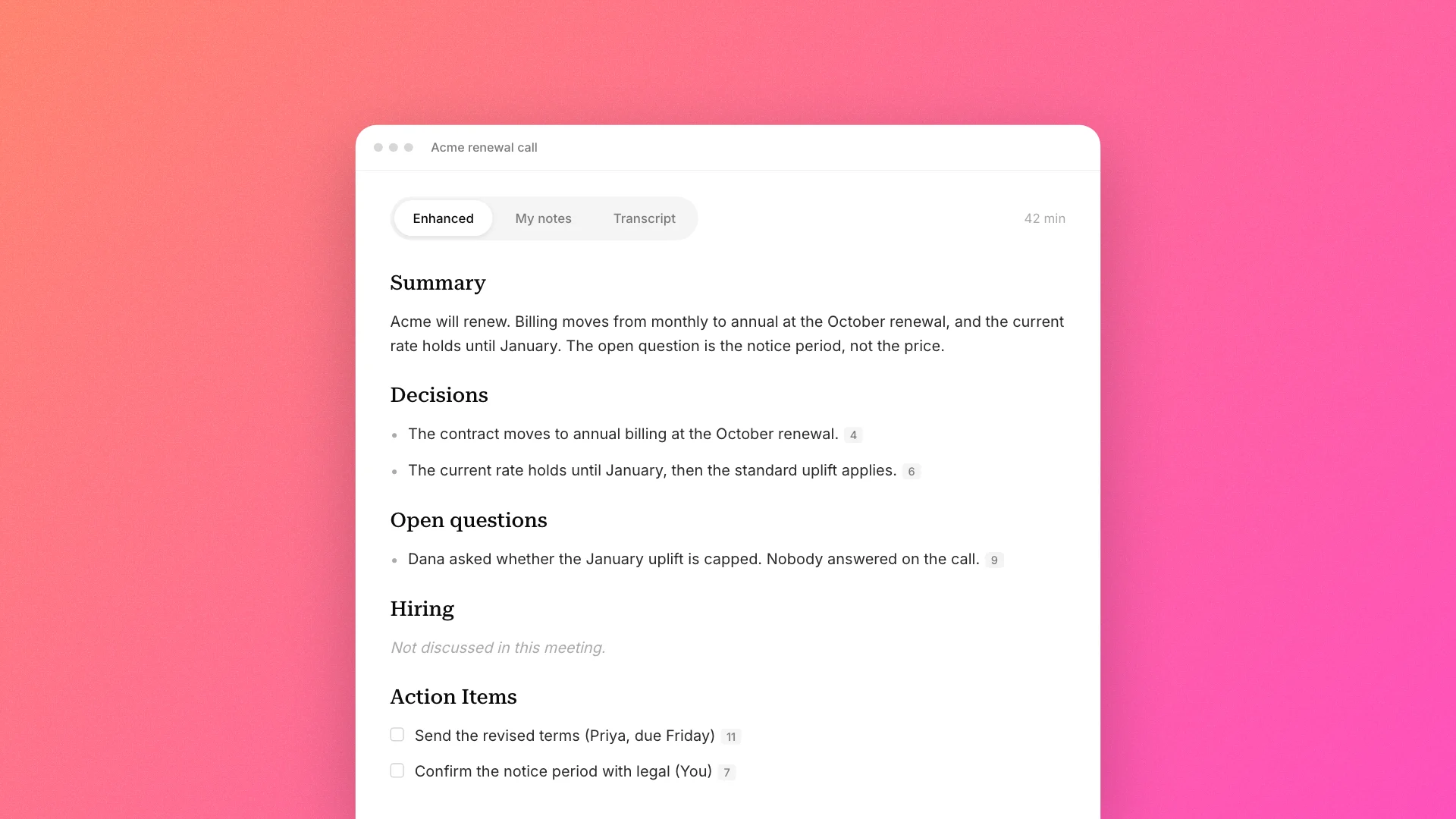
What you type steers the summary. Put a word on its own line and it becomes a heading, in your wording, filled in from what was said. So this, typed during the call:
Renewal
ask legal about the notice period
Hiring
comes back as this:
# Renewal
- The contract moves to annual billing in October, with the current rate held until January. [4]
- Two people pushed back on the notice period rather than the number itself. [7]

# Hiring
Not discussed in this meeting.

# From your notes (not discussed)
- ask legal about the notice period

# Action Items
- [ ] Send the revised terms (Priya, due Friday) [11]
Three things happened there. A heading the meeting never reached says so, rather than being filled with something plausible. A line you typed that nobody said is kept verbatim, under a heading that names it as yours. And the bracketed numbers point at the transcript moment each line came from, so clicking one takes you to the words behind it.
Almost nobody rereads a transcript. The write-up is the thing people act on, and it goes on to become the follow-up email, the line in the CRM, the recap for whoever missed the call. A summary that quietly promotes your own reminder into a decision the room made is wrong in four places by Friday, and by then nobody is checking it against what was said.
Action items work under the same rule. An owner appears only where a name was spoken, a due date only where a date was spoken, and "by Friday" resolves against the meeting's own date. Nothing is guessed. The follow-up email is assembled from those same extracted items. A model does not draft it from scratch, and it cannot introduce a commitment that is not already in your notes.
The whole note is one editable document. You can reword a bullet or tick an action item off. Every meeting also saves as a Markdown file in a folder you choose, and your edits carry into the file.
Where meetings are processed
By default, both audio streams are transcribed in Epilude's cloud through your Epilude account, and you need an internet connection while recording. On a supported Mac you can move transcription onto the machine instead: switch on Local transcription in Settings and meeting audio never leaves your Mac. In Local Mode, meetings always transcribe locally.
The summary is the one step that stays in the cloud. Writing one means reading the whole transcript at once, and doing that well on your Mac beside a live call is not something we can do yet. Generating notes sends the transcript text, never audio, to Epilude's cloud. In Local Mode, Epilude does not offer summaries at all rather than quietly sending your transcript somewhere you said things should not go.
Cloud transcription and summaries need a subscription. The Pay Once plan records meetings with Local transcription: you keep the live transcript and the note, and summaries remain a subscription feature. Epilude says so before you press record rather than halfway through a call.
What Epilude keeps is on your Mac. With cloud transcription, audio is processed for transcription and not stored on Epilude's servers; with Local transcription it is never sent at all. The recording itself is saved only if you turn on Save audio recordings in Settings, which is off by default.
Availability
Notetaker is available with an Epilude subscription and during the free trial, and the Pay Once plan records meetings with Local transcription on supported Macs. Start a recording with ⌘⇧M, or click Take notes on the widget that appears when Epilude notices a call starting in Zoom, Meet, Teams, or a Slack huddle. The full walkthrough is in the Notetaker guide, and the feature page covers what the summaries look like across meeting types.
Then keep whatever you use today and run Epilude beside it on your next real call. Read both write-ups and check the parts you would have acted on: the owner, the date, the decision that made it into the follow-up. Keep the one that got them from the meeting rather than from a model.