Notetaker writes the summary when each call ends. We built Chat for what comes after, when you need an answer from your notes and don't want to reread them all.
Today we're introducing Chat in Notetaker. Ask about one meeting or your whole library, and Chat answers from your saved notes and transcripts, with sources you can check.
Ask your notes
Open a meeting and choose Chat, or use Chat in the sidebar to ask across meetings. You can narrow the question to particular notes, dates or tags.
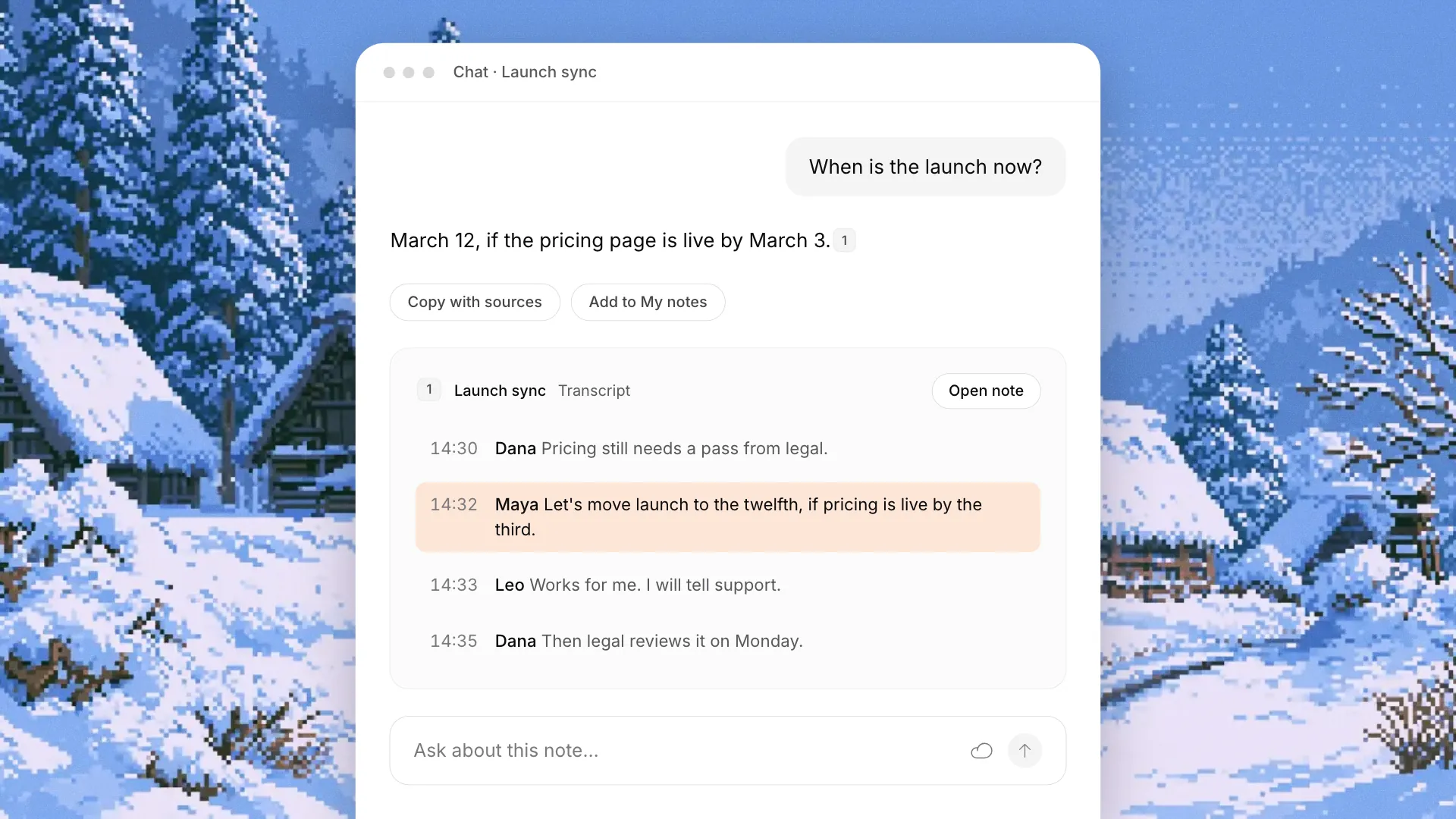
Try "What did we agree about the launch date?" The answer comes with numbered sources. Click one to read the passage it came from, then open the note at the matching lines in the transcript.
You can also attach a brief or agenda and ask how the discussion compares. During a call, What did I miss? helps you catch up on the last few minutes while recording continues.
Use the answer
Copy with sources copies the answer with its source list attached, ready for a recap email. Add to My notes lets you save it to a meeting after checking a preview.
Questions you ask every week can become Chat shortcuts, so you can reuse them.
Available now
Chat is available in Epilude 1.5.0 with Pro and the free trial.
Chat uses a cloud model, including for meetings recorded in Local Mode. It sends your question and relevant passages, never your recording. Conversation history stays on your Mac. Chat limits and privacy has the details.
Open Chat in the sidebar or ask a question in a note.